How Software and Hardware Interaction Layers Work
When you click a mouse button or stream a video, a cascade of invisible processes bridges the gap between the code you wrote (or the app you opened) and the silicon that powers your device. Those bridging mechanisms are known as software & hardware interaction layers, and they’re the glue that lets high‑level programs talk to low‑level components without each side needing to understand the other’s inner workings. In this deep dive we’ll unpack the major layers, why they exist, and how developers can navigate them more effectively.
Understanding Software & Hardware Interaction Layers
At the most abstract level, an interaction layer is a set of abstractions, APIs, and protocols that translate requests from software into signals a piece of hardware can act on—and vice versa. Think of it as a bilingual interpreter at a diplomatic summit: the software speaks “application language,” the hardware speaks “electrical language,” and the layer ensures both parties leave the table with the same agreement.
The Role of Abstraction
Abstraction shields developers from the messy details of transistor timing, voltage thresholds, and bus arbitration. By exposing a clean, consistent interface, the layer lets you write code once and run it on many devices. That’s why operating systems, drivers, and firmware all sit somewhere in this hierarchy.
Why These Layers Matter
Without a well‑designed interaction stack, every application would need to be custom‑written for each chip, board, or peripheral—a logistical nightmare. Interaction layers also enable:
- Portability: The same binary can run on ARM, x86, or RISC‑V with only the underlying drivers swapped.
- Security: Sandboxing and permission checks are enforced at the boundary between software and hardware.
- Performance Optimizations: Drivers can batch operations or use DMA (direct memory access) to offload work from the CPU.
Key Layers Explained
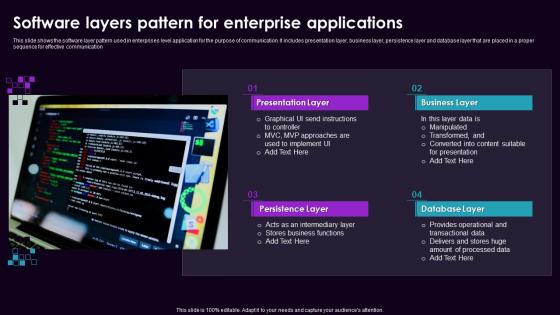
While the exact stack varies by platform, most modern systems share a handful of common layers.
1. Firmware (Bootloader & BIOS/UEFI)
Firmware is the first code that runs when power is applied. It performs hardware initialization, runs POST (Power‑On Self‑Test), and hands control to the operating system. Although tiny, firmware defines the initial contract between silicon and software—setting clock speeds, configuring memory, and exposing basic I/O interfaces.
2. Kernel (Operating System Core)
The kernel sits in the middle, managing resources like CPU time, memory, and device access. It offers system calls—standardized entry points that applications use to request services such as file I/O, networking, or process creation. Under the hood, the kernel translates these calls into low‑level commands the hardware understands.
3. Device Drivers
Drivers are specialized modules that understand a specific piece of hardware. Whether it’s a graphics card, network adapter, or temperature sensor, the driver knows the device’s register map, interrupt scheme, and power states. It presents a uniform API (often via the kernel) so higher‑level software can treat disparate devices in a similar fashion.
4. Runtime Libraries & Middleware
Above the kernel, runtime libraries (like the C standard library) and middleware (such as graphics engines) provide higher‑level abstractions. For example, OpenGL abstracts GPU commands into a platform‑agnostic set of functions, while the driver maps those functions to the actual hardware instructions.
5. Application Layer
This is where your code lives—games, office suites, browsers, and so on. By the time an application runs, it’s rarely speaking directly to hardware; instead, it relies on the layers below to handle the gritty details.
Challenges and Best Practices
Even with these layers, developers encounter pitfalls. Understanding them helps avoid bugs and performance hiccups.
Latency and Overhead
Each translation step adds a tiny amount of latency. In real‑time systems (e.g., robotics or high‑frequency trading), that overhead can be unacceptable. Strategies include using zero‑copy buffers, leveraging DMA, or writing custom kernel modules that cut out intermediate copies.
Compatibility Drift
Hardware vendors often release new silicon revisions that tweak register layouts or timing requirements. If drivers aren’t updated promptly, software may misbehave. Maintaining a clear separation between driver code and application logic makes it easier to swap out or upgrade drivers without rewriting the entire stack.
Security Boundaries
Interaction layers are prime targets for attackers seeking to bypass isolation. Employing strict privilege separation—where drivers run in a limited context and only expose necessary interfaces—helps mitigate risks. Modern operating systems also use techniques like IOMMU (Input‑Output Memory Management Unit) to prevent rogue DMA attacks.
Testing Across the Stack
Unit tests alone won’t catch mismatches between layers. Integration testing on real hardware, combined with hardware‑in‑the‑loop (HIL) simulations, provides confidence that the abstractions hold up under varied conditions.
Future Trends
As devices become more heterogeneous—think edge AI accelerators, quantum co‑processors, and ultra‑low‑power sensors—the interaction stack is evolving. Emerging standards like SPIR‑V for GPU shaders and OpenXR for mixed reality aim to unify APIs across disparate hardware. Meanwhile, microkernel designs are gaining traction for their minimal trusted base, reducing the attack surface between software and hardware.
FAQ
- What’s the difference between a driver and firmware? Firmware initializes hardware and runs before the OS boots, while drivers operate after the OS is loaded, translating OS requests into hardware actions.
- Can I bypass the OS to talk directly to hardware? In theory, yes—bare‑metal programming does this. In practice, you lose many safety nets, portability, and often need detailed hardware documentation.
- Why does a graphics application sometimes feel “laggy” even on a powerful GPU? Lag can stem from driver inefficiencies, synchronization overhead, or suboptimal use of the kernel’s scheduling policies.
- Are interaction layers the same on smartphones and PCs? The core concepts are similar, but mobile platforms often use a more tightly integrated stack (e.g., Android’s HAL layer) to meet power and latency constraints.