How to Choose Between GoTo Resolve and LogMeIn for Remote Access
Understanding Your Remote Access Needs
Before diving into a head‑to‑head comparison, pause and ask yourself what you really need from a remote‑access solution. Are you troubleshooting occasional client machines, managing a fleet of corporate endpoints, or providing tech support from home? The answer shapes everything from required features to budget constraints. Small‑business owners often prioritize simplicity and cost‑effectiveness, while IT departments look for granular control, audit trails, and seamless integration with existing directories. Clarifying these priorities prevents you from getting dazzled by flashy features that you’ll never use.
Feature Showdown: GoTo Resolve
GoTo Resolve, part of the GoTo family, markets itself as a lightweight, on‑demand support tool. Its standout is the “instant session” link, which lets a technician connect without the end user installing any software—just a browser session. That convenience translates into faster ticket resolution for ad‑hoc help desks.
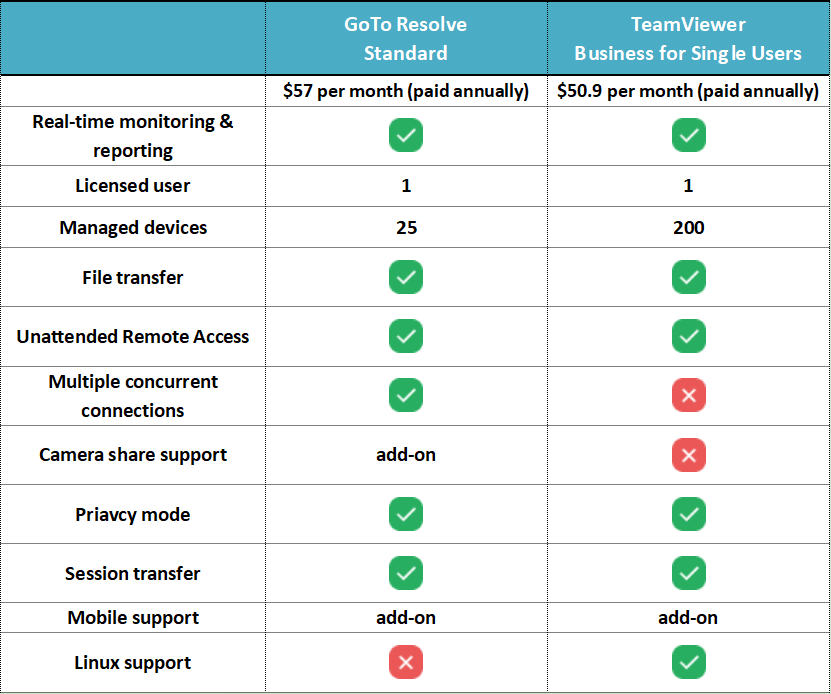
Beyond the quick‑connect, GoTo Resolve offers file transfer, session recording, and multi‑monitor support. Integration with GoTo Connect and GoTo Meeting means you can hand off a support call to a video conference without leaving the platform. However, the product leans toward single‑session usage; it lacks the deep device management capabilities you’d find in a full‑blown remote‑desktop suite.
Feature Showdown: LogMeIn
LogMeIn positions itself as a more comprehensive remote‑access and monitoring platform. Its flagship offering, LogMeIn Pro, grants persistent remote computers that stay online 24/7, making it ideal for continuous monitoring or managing servers. The service also includes remote printing, multi‑user access, and a robust set of administrative tools.
For teams that need collaboration, LogMeIn’s “Central” product adds patch management, endpoint reporting, and role‑based permissions. The platform’s strength lies in its scalability: you can roll out agents to dozens—or hundreds—of machines from a single console. The trade‑off is a steeper learning curve and a price tag that reflects its enterprise‑grade ambitions.
Pricing and Value Comparison
Cost is often the make‑or‑break factor. GoTo Resolve is sold on a per‑session or monthly subscription basis, typically ranging from $15 to $30 per user per month. This pay‑as‑you‑go model works well for businesses that only need occasional support bursts.
LogMeIn Pro starts around $30 per month for a single computer, with discounts for multi‑computer bundles. LogMeIn Central, aimed at larger teams, can climb into the hundreds per month, depending on the number of endpoints and feature tiers. While the upfront expense is higher, the persistent access and management tools can offset the cost for organizations that rely heavily on remote administration.
Security Considerations
Both platforms claim end‑to‑end encryption, but their implementations differ. GoTo Resolve uses TLS 1.2 for all sessions, and because the connection is browser‑based, there’s less surface area for credential leakage. Each session generates a unique, time‑limited link that expires automatically.
LogMeIn employs 256‑bit AES encryption and offers two‑factor authentication (2FA) for added protection. Its persistent agents, however, mean a device is constantly listening for inbound connections, which could be a concern if the host machine is compromised. Companies with strict compliance requirements often favor LogMeIn’s granular permission settings and detailed audit logs.
Performance and Reliability
Real‑world performance hinges on network conditions. Users consistently report that GoTo Resolve delivers smooth screen rendering over moderate bandwidth, thanks to its adaptive compression algorithms. Because sessions are short‑lived, any hiccup is often resolved by simply reconnecting.
LogMeIn’s persistent connections can suffer on flaky networks, though the platform does include bandwidth throttling options to mitigate lag. On stable corporate networks, however, LogMeIn’s full‑resolution streaming and multi‑monitor support tend to outperform the more lightweight GoTo Resolve.
Ease of Use and Support
GoTo Resolve shines in simplicity: the end user clicks a link, and the technician is in seconds. There’s no need for IT staff to walk users through installation steps, which reduces support overhead. The web‑based interface is intuitive, though power users might miss deeper configuration options.
LogMeIn, by contrast, requires an initial client install on each remote machine. Once set up, though, the console offers extensive device grouping, scheduled tasks, and remote scripting. For organizations that can dedicate resources to onboarding, the richer feature set can pay dividends in long‑term efficiency.
Which Solution Fits Your Workflow?
If your primary goal is quick, occasional assistance—think a freelance IT consultant or a small office handling sporadic issues—GoTo Resolve likely offers the best balance of cost and convenience. Its instant session model minimizes friction for both tech and end user.
Conversely, if you manage a growing fleet of workstations, need persistent remote access, or must comply with rigorous security policies, LogMeIn’s broader suite provides the infrastructure you’ll need. The ability to push updates, enforce policies, and audit activity makes it a solid choice for medium to large enterprises.
FAQ
- Can I use GoTo Resolve on mobile devices? Yes, GoTo Resolve works through a mobile browser, letting technicians join sessions from smartphones or tablets without installing an app.
- Does LogMeIn support Linux machines? LogMeIn Pro primarily targets Windows and macOS, but LogMeIn Central can monitor Linux servers via agent‑less SNMP monitoring, though remote control is limited.
- Which platform offers better file transfer speeds? In controlled network environments, LogMeIn’s persistent connection usually yields faster file transfers, while GoTo Resolve’s speeds depend on the temporary session’s bandwidth.
- Is two‑factor authentication mandatory for both services? Both providers support 2FA, but it’s optional and must be enabled by the administrator; it’s strongly recommended for any production deployment.