How to Replace the Battery in a 2007 Toyota Camry Key Fob
If you’ve ever tried to lock or unlock your 2007 Toyota Camry only to hear a faint click, the culprit is probably a dead key fob battery. Swapping out the tiny cell is a quick DIY job that saves a trip to the dealer and a few bucks. Below is a straightforward guide that walks you through every step of a 2007 Toyota Camry key fob battery replacement, from gathering tools to confirming the new battery works.
Tools and Materials You’ll Need
- A small flat‑head screwdriver or a plastic prying tool
- A fresh CR2032 lithium coin battery (the most common size for this model)
- A soft cloth or microfiber towel
- Optional: tweezers for handling the battery
All of these items are inexpensive and can be found at an auto parts store, a big‑box retailer, or even online. Having a clean workspace and a bit of patience will keep the process smooth.
Step‑by‑Step 2007 Toyota Camry Key Fob Battery Replacement
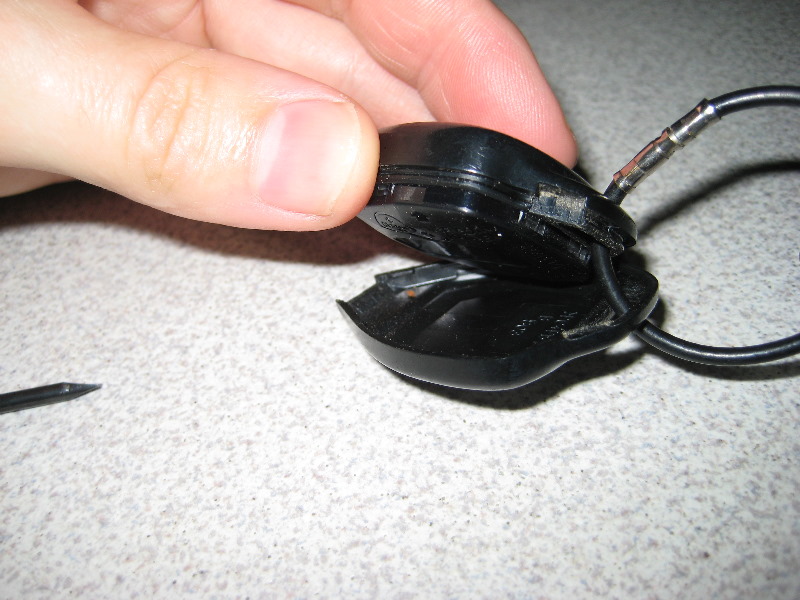
1. Locate the seam and open the fob
The key fob consists of two halves that snap together. Look for a narrow groove along the edge—usually on the side opposite the buttons. Slip the flat‑head screwdriver gently into the groove and twist just enough to pry the halves apart. If you have a plastic prying tool, use it to avoid scratching the housing.
2. Identify the existing battery
Once the shell is open, you’ll see a silver‑colored disc tucked into a small compartment. That’s the CR2032 battery, marked with a plus (+) sign on one side. Note its orientation; the positive side typically faces up toward the circuit board.
3. Remove the old battery
Use your fingernail or a pair of tweezers to lift the battery out. Some fobs have a tiny metal clip holding it in place—press the clip gently outward before sliding the cell free. Dispose of the spent battery according to local regulations.
4. Insert the new CR2032
Place the fresh battery in the same slot, matching the orientation you just recorded. The + side should face the same direction as the old one. Press lightly until it sits flush; you should hear a faint click when it locks into place.
5. Reassemble the fob
Align the two halves of the key fob, ensuring the latch or seam lines up correctly. Snap the shell together firmly but without excessive force—your fob should feel solid, not cracked.
6. Test the new battery
Press any button on the fob. The doors should lock or unlock instantly, and the panic alarm (if equipped) should sound when you hold the red button. If nothing happens, double‑check the battery orientation and the seal of the housing.
Tips for a Hassle‑Free Swap
- Buy a reputable brand. Cheap off‑brand batteries may have lower voltage, leading to premature failure.
- Keep the old battery for reference. A quick photo before removal can save you a guess about orientation.
- Store the spare battery in a dry place; moisture can corrode the contacts.
- If the fob still won’t work after replacement, try re‑synchronizing it by inserting the key into the ignition, turning it to “ON,” and pressing the lock button twice.
When to Seek Professional Help
Most 2007 Toyota Camry key fob battery replacements are DIY‑friendly, but a few scenarios merit a visit to a dealership or locksmith. If the fob’s plastic housing is cracked, the internal circuit board appears damaged, or the fob won’t pair after a fresh battery, a professional can diagnose a deeper issue. In rare cases, the transponder chip inside the fob may need reprogramming.
Frequently Asked Questions
What type of battery does a 2007 Toyota Camry key fob use?
It uses a CR2032 3‑volt lithium coin cell. This size is widely available and typically marked with “CR2032” on the packaging.
Can I use a rechargeable battery instead of a CR2032?
While rechargeable “coin” cells exist, they often have a lower voltage (about 2.5 V) and may not provide enough power for the fob’s radio signal, leading to inconsistent performance.
How long should a new battery last?
Under normal use, a CR2032 can power a Camry key fob for three to five years. Frequent remote locking/unlocking or using the panic button more often can shorten that lifespan.
Is there a way to reset the key fob after changing the battery?
Usually not needed, but if the fob seems unresponsive, place the key inside the ignition, turn it to the “ON” position, and press any button on the fob twice. This often re‑establishes the connection.