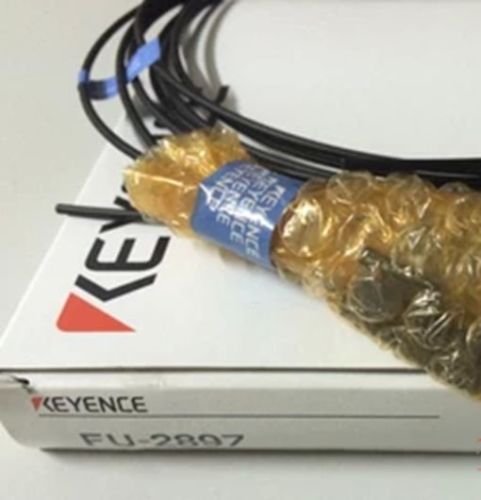
How to Set Up a Keyence Fiber Optic Sensor: A Complete Guide
Fiber‑optic sensing has become a go‑to solution for many manufacturers who need fast, reliable detection without the electrical noise that can plague traditional photoelectric devices. If you’ve just bought a Keyence model—or are planning to—understanding the Keyence fiber optic sensor setup process will save you hours of trial and error. Below you’ll find a step‑by‑step walkthrough, from choosing the right head to fine‑tuning the alarm thresholds, plus a few troubleshooting tips that keep the system humming.
Why Choose a Keyence Fiber Optic Sensor?
Keyence’s lineup stands out for three reasons. First, the optical fibers themselves are immune to EMI, which makes them ideal for high‑speed conveyors and harsh industrial environments. Second, the sensors often feature built‑in diagnostics that alert you to fouling or misalignment before a false reject slips through. Finally, the modular design lets you swap emitters, receivers, and lenses without replacing the whole unit, keeping long‑term costs low.
1. Pick the Right Sensor Model
Keyence offers several families, such as the FS‑ series for general purpose detection and the FSL‑ series for long‑range applications. Your choice hinges on three factors:
- Detection distance: Measure the gap between the emitter and the target. FS‑ models typically cover up to 150 mm, while FSL‑ models can reach 500 mm or more.
- Target material: Reflective metal surfaces work well with standard lenses, but darker plastics may need a higher‑gain receiver or a specialized diffuser.
- Environmental conditions: If you’re dealing with dust, moisture, or temperature swings, look for a sensor with an IP67 rating and built‑in self‑cleaning options.
2. Gather the Required Hardware
Before you start wiring, make sure you have these items on hand:
- Keyence sensor unit (emitter + receiver)
- Appropriate fiber optic cable (usually 1 mm core, MC‑PC connector)
- Power supply (24 V DC is standard for most models)
- Signal output cable (PNP/NPN, analog voltage, or relay)
- Mounting brackets or a custom fixture
- Adjustment tools: a small screwdriver, a fiber‑cleaning swab, and a torque wrench if you’re bolting the unit down
3. Install the Sensor Physically
Position the emitter and receiver so the fiber ends face each other straight across the detection zone. A misaligned pair can cause signal loss that looks like a sensor fault. Follow these steps:
- Secure the brackets to a solid part of the frame—preferably a vibration‑damped section.
- Slide the fiber cable through the connector ports, making sure the MC‑PC sleeves click into place.
- Use a clean, lint‑free swab dipped in isopropyl alcohol to wipe each fiber end. Even a speck of dust can scatter light dramatically.
- Tighten the mounting bolts to the manufacturer‑specified torque (usually around 1.5 Nm). Overtightening can bend the fiber and degrade performance.
4. Wire the Power and Signal Connections
The wiring diagram is printed on the sensor’s front panel, but here’s a quick rundown:
- Power: Connect the 24 V DC positive to the + terminal and ground to the – terminal. Some models accept 12 V, but you’ll lose the full detection range.
- Signal output: Choose the output type that matches your PLC or controller. For PNP, connect the output to the PLC’s input and the common ground. For analog voltage, hook the Vout to the analog channel and calibrate the scaling in software.
- Optional external alarm: Some Keyence sensors have a spare “alarm” terminal that can drive a buzzer or indicator light when the detection threshold is crossed.
5. Configure the Sensor Settings
Most Keyence units are programmed via a small LCD screen and a few buttons, or through a USB‑to‑PC interface using the Keyence Configurator software. Key settings include:
- Detection mode: Choose “continuous” for high‑speed belts or “single‑pulse” for counting applications.
- Threshold level: Adjust the sensitivity so the sensor only triggers on the intended object. A good rule of thumb is to set the threshold at 70 % of the signal you measured when the target was present.
- Hysteresis: Enable a small buffer (usually 5‑10 %) to prevent rapid on/off cycling when the target hovers near the edge of the detection zone.
- Output inversion: Some controllers expect a low‑signal for detection; flip the output polarity if needed.
6. Test and Fine‑Tune
Run a few test pieces through the sensor’s line of sight. Watch the LCD readout or the PLC’s status indicator to verify that the sensor reacts as expected. If you notice missed detections:
- Re‑check the fiber alignment—tiny angular shifts are common after a vibration event.
- Clean the fiber ends again; contaminants often accumulate during initial runs.
- Increase the gain or lower the threshold in the configuration menu.
Conversely, if you get false triggers, reduce the gain or add a physical shield to block stray light.
7. Routine Maintenance and Diagnostics
Keyence sensors include self‑diagnostic LEDs that flash different patterns for issues like “no signal,” “cable fault,” or “over‑temperature.” Incorporate a quick visual check into your daily start‑up routine:
- Inspect the LED status; a steady green means “ready,” while a blinking amber signals a warning.
- Every month, wipe the fiber ends with a fresh alcohol swab.
- If the sensor operates in a dusty environment, consider a protective housing with a small purge of compressed air.
FAQ
What is the maximum distance a Keyence fiber optic sensor can reliably detect?
It depends on the model. Standard FS‑ series sensors handle up to about 150 mm, while the FSL‑ series can exceed 500 mm with the right lens and a clean target.
Can I use a Keyence sensor with a 12 V power supply?
Some lower‑range models support 12 V, but you’ll sacrifice part of the detection range and sensitivity. For most industrial setups, a stable 24 V DC source is recommended.
How often should I clean the fiber ends?
At a minimum once per month, or whenever you notice a drop in detection reliability. In harsh environments, weekly cleaning may be prudent.
Is it possible to connect multiple sensors to a single PLC input?
Only if you use an external OR/AND logic module or a PLC that supports multi‑sensor input processing. Directly wiring several outputs together can damage the sensors or create ambiguous signals.