Understanding Class Diagrams: A Step‑by‑Step Beginner’s Guide
When you first hear the term “class diagram,” it can feel like jargon from a distant software engineering department. In reality, a class diagram is simply a visual shorthand for the structure of an object‑oriented system. By turning code into boxes and lines, you get a bird’s‑eye view that makes it easier to spot relationships, spot missing pieces, and communicate ideas across teams. This guide walks you through the basics, from the symbols you’ll see to the best practices for drawing your own.
What Is a Class Diagram?
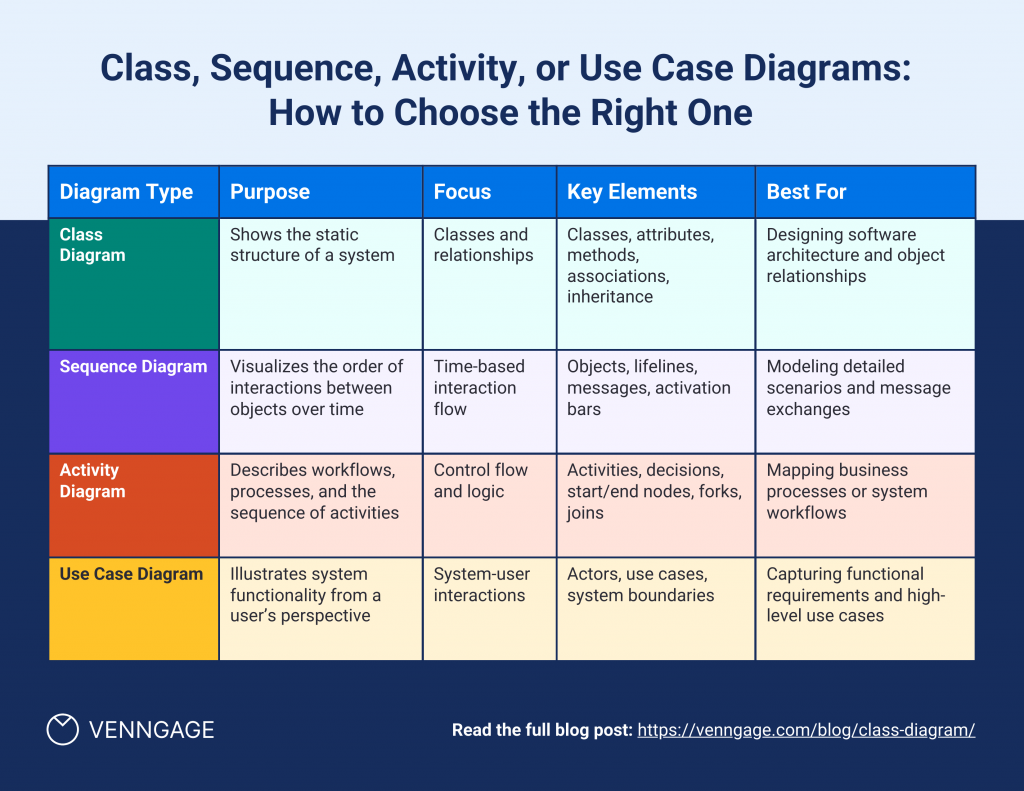
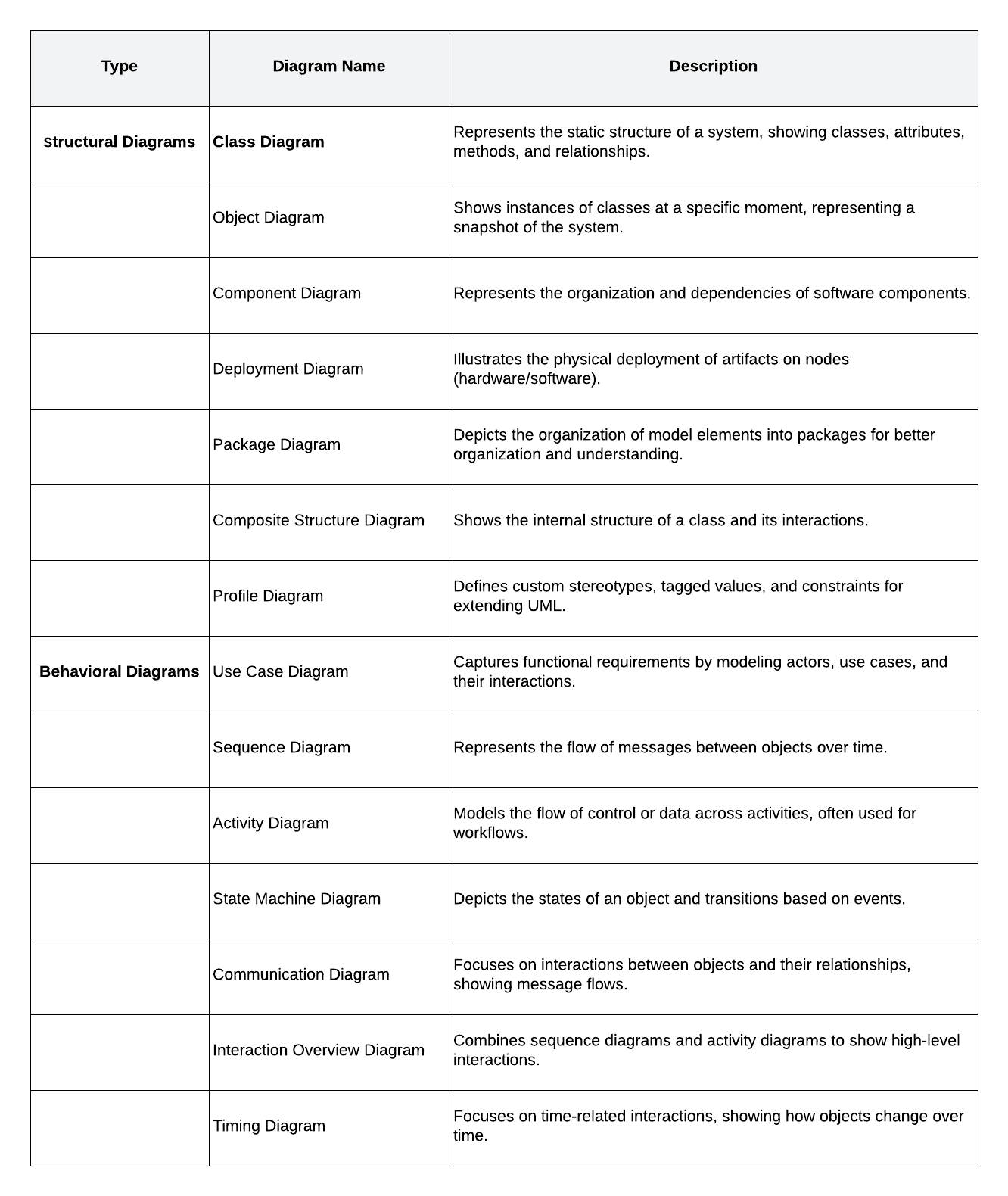
A class diagram belongs to the Unified Modeling Language (UML) family, a standardized way to depict software designs. At its core, the diagram shows classes—the templates for objects—along with their attributes, operations, and the connections between them. Think of it as a blueprint for a building: the walls, doors, and windows correspond to class members, while the hallways represent how those rooms interact.
Because it abstracts away implementation details, a class diagram lets developers, analysts, and even non‑technical stakeholders grasp the overall architecture without getting lost in code syntax.
Key Elements of a Class Diagram
Every diagram follows a handful of conventions. Recognizing them early saves you from misreading the picture later.
- Class Box: Divided into three compartments—name, attributes, and operations. The name sits at the top, often bolded.
- Attributes: Listed in the middle section, each line usually follows the format visibility name : type. For example,
+ age : intdenotes a public integer field. - Operations (Methods): Appear in the bottom compartment, using a similar syntax.
# calculateSalary() : doubleindicates a protected method returning a double. - Visibility Symbols:
+for public,-for private,#for protected, and~for package‑private. - Relationships: Lines with arrows or diamonds that show inheritance, association, aggregation, and composition.
Understanding each piece lets you decode even the most crowded diagrams.
How to Read a Simple Class Diagram
Start with the class names. Identify which ones sit at the top of the hierarchy—these are usually abstract base classes. Then trace the arrows:
- Inheritance (Generalization): A solid line with a hollow triangle points from a subclass to its parent. It means the subclass inherits attributes and methods.
- Association: A plain line, sometimes labeled with role names or multiplicities (e.g., 1..*, 0..1), signals that objects of one class hold references to objects of another.
- Aggregation: A line ending in an open diamond shows a “whole‑part” relationship where the part can exist independently.
- Composition: A solid diamond indicates strong ownership—if the whole is destroyed, its parts disappear too.
By following these cues, you can reconstruct the data flow and responsibility distribution without peeking at the source code.
Common Mistakes Beginners Make
Even seasoned developers slip up when sketching their first diagrams. Here are the pitfalls that tend to trip up newcomers:
- Mixing up aggregation and composition. The difference hinges on lifecycle dependence, not just “part‑of” semantics.
- Overloading a single class box with too many attributes or methods, which obscures rather than clarifies.
- Neglecting multiplicity notation, leaving readers guessing whether a relationship is one‑to‑one or one‑to‑many.
- Using vague names like “Data” or “Info” instead of domain‑specific terminology.
Spotting these issues early keeps your diagram readable and useful.
Tips for Creating Your First Diagram
Ready to draw? Follow these practical steps to produce a clean, communicative class diagram.
- Identify Core Concepts: List the main entities in your problem domain before you think about code.
- Define Attributes and Operations: Keep each class focused; adhere to the single‑responsibility principle.
- Map Relationships: Decide whether each connection is inheritance, association, aggregation, or composition, then add the appropriate line style.
- Apply Consistent Notation: Stick to a single UML style guide—most tools (like Lucidchart or draw.io) let you enforce it automatically.
- Iterate: Show the draft to a teammate, incorporate feedback, and simplify where possible.
Remember, a diagram is a living document. As your system evolves, so should the visual representation.
Frequently Asked Questions
Can I use a class diagram for non‑object‑oriented projects?
While class diagrams shine with OO designs, they can still help outline data structures in procedural code. However, you’ll likely rely more on other UML diagrams—like component or deployment diagrams—for non‑OO contexts.
Do I need special software to draw class diagrams?
No. Paper and pencil work for brainstorming, but digital tools such as PlantUML, StarUML, or even free online canvas apps make editing and sharing easier, especially when collaborating with remote teams.
How detailed should a class diagram be for a small project?
Aim for clarity over completeness. Include only the classes and relationships that directly affect the features you’re discussing. Over‑detail can drown stakeholders in unnecessary information.
Is it okay to omit visibility symbols?
In informal sketches, many teams skip visibility markers for speed. For formal documentation, however, keeping them ensures the diagram accurately reflects access levels and encapsulation rules.