Understanding CSRs: Effortless Certificate Renewal Steps
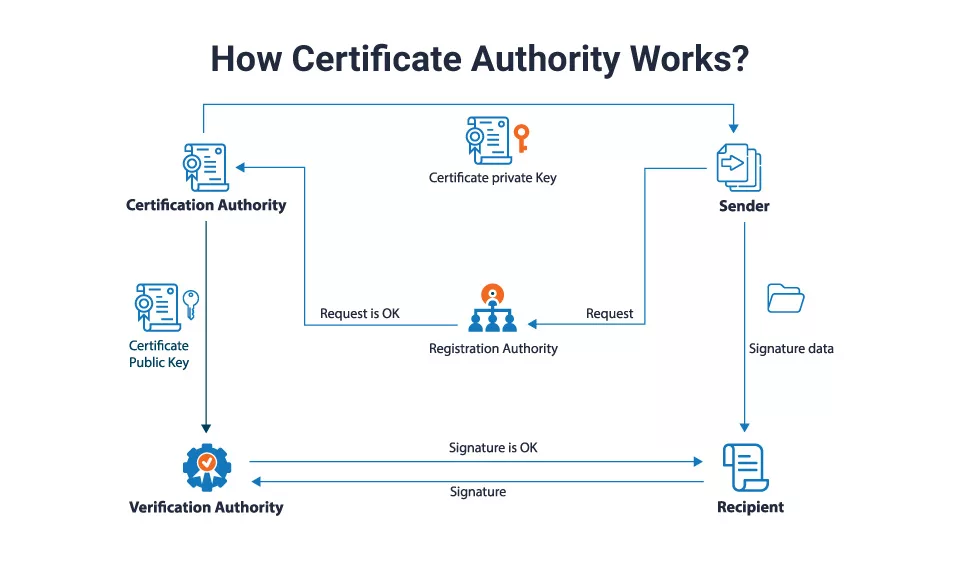
When you think about securing a website, SSL/TLS certificates usually come to mind. Behind every certificate is a CSR explained—the Certificate Signing Request—that bridges the gap between your server and the certification authority (CA). If you’ve ever wondered how to renew a certificate without a headache, knowing how a CSR works is the first, simplest step.
CSR Explained and Its Role in Certificate Renewal
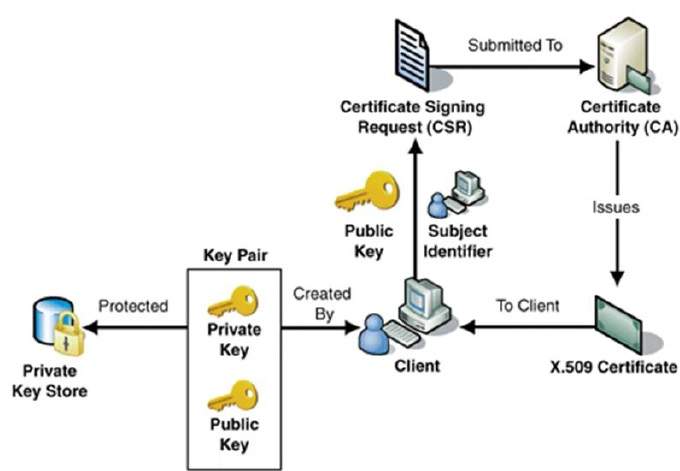
A CSR is a block of encoded text that contains your public key and identifying information about your site. Think of it as a formal application to a CA, asking, “Can you sign this key so my visitors see a trusted lock icon?” The CA verifies the data, signs it, and returns a certificate that matches the public key inside the CSR. When it’s time to renew, the same CSR or a new one is sent to the CA to obtain a fresh certificate with a new expiration date.
What Information Lives Inside a CSR?
- Common Name (CN): The domain name the certificate will protect.
- Organization and Unit: Company name and department.
- Location: City, state, and country.
- Public Key: The key that will pair with the private key stored on your server.
- Optional Extensions: Subject Alternative Names (SANs), key usage, and extended key usage.
When Do You Need a New CSR?
Most often, you generate a new CSR when you:
- Change the domain or add new subdomains.
- Switch hosting providers or servers.
- Upgrade to a higher‑tier certificate (e.g., from domain to wildcard).
- Replace a compromised private key.
If none of those scenarios apply, you can typically reuse the original CSR for renewal, which saves time.
Step‑by‑Step Guide to Creating a CSR
The process varies slightly between operating systems and web servers, but the core steps are consistent. Below is a concise, server‑agnostic walkthrough that applies to most Linux setups.
1. Generate a Private Key
Run the following OpenSSL command:
openssl genrsa -out example.key 2048This creates a 2048‑bit RSA private key stored in example.key. Keep this file safe—losing it means you cannot decrypt traffic that the certificate encrypts.
2. Create the CSR
Use the private key to generate the CSR:
openssl req -new -key example.key -out example.csrYou’ll be prompted for the Common Name, organization details, and optional fields. Once completed, example.csr is ready to send to your CA.
3. Submit the CSR to Your CA
Most CA portals allow you to paste the CSR directly into a form. After validation, they issue a signed certificate (usually as .crt or .pem). Download it and keep it alongside your private key.
4. Deploy the New Certificate
Configure your web server (Apache, Nginx, etc.) to use the new certificate and key. Restart the server and verify the installation using tools like Qualys SSL Labs.
Common Pitfalls and How to Avoid Them
Even seasoned admins stumble over these issues:
- Mismatched CN: If the CSR’s Common Name doesn’t match the domain you’re protecting, the browser will flag it.
- Wrong Key Length: Many CAs now require at least 2048 bits; using older keys can lead to rejection.
- Leaving the Private Key Exposed: Sharing or storing the key insecurely can compromise your site.
- Skipping Renewal Alerts: Renewing a week before expiration avoids downtime.
Certificate Renewal Made Easy: Automation Tips
Manual renewal is fine for a few sites, but scaling up calls for automation. Here are three practical methods:
1. Let the CA Handle Renewal
Some CAs, like Let’s Encrypt, provide certbot or similar tools that automatically generate CSRs, validate, and install certificates. You set a cron job to run twice a month, and the rest is handled.
2. Use a Managed Hosting Platform
Platforms such as Cloudflare or Amazon Lightsail can issue and renew certificates behind the scenes. You only need to enable HTTPS in the dashboard.
3. Employ a Self‑Hosted Automation Tool
Open-source solutions like acme.sh or certbot-auto give you full control. They generate a new CSR on each renewal, submit it, and reload your web server automatically.
Whichever path you choose, the key principle remains the same: keep your CSR generation process simple, document the steps, and schedule regular checks.
FAQ
- Can I reuse the same

![How to Generate Private Key & CSR? [Different Methods]](https://cheapsslweb.com/blog/wp-content/uploads/2025/04/certificate-pinning.webp)