Building ASP.NET Core Web APIs: A Beginner’s Guide to Simple Development
Why ASP.NET Core is a Natural Fit for Web API Projects
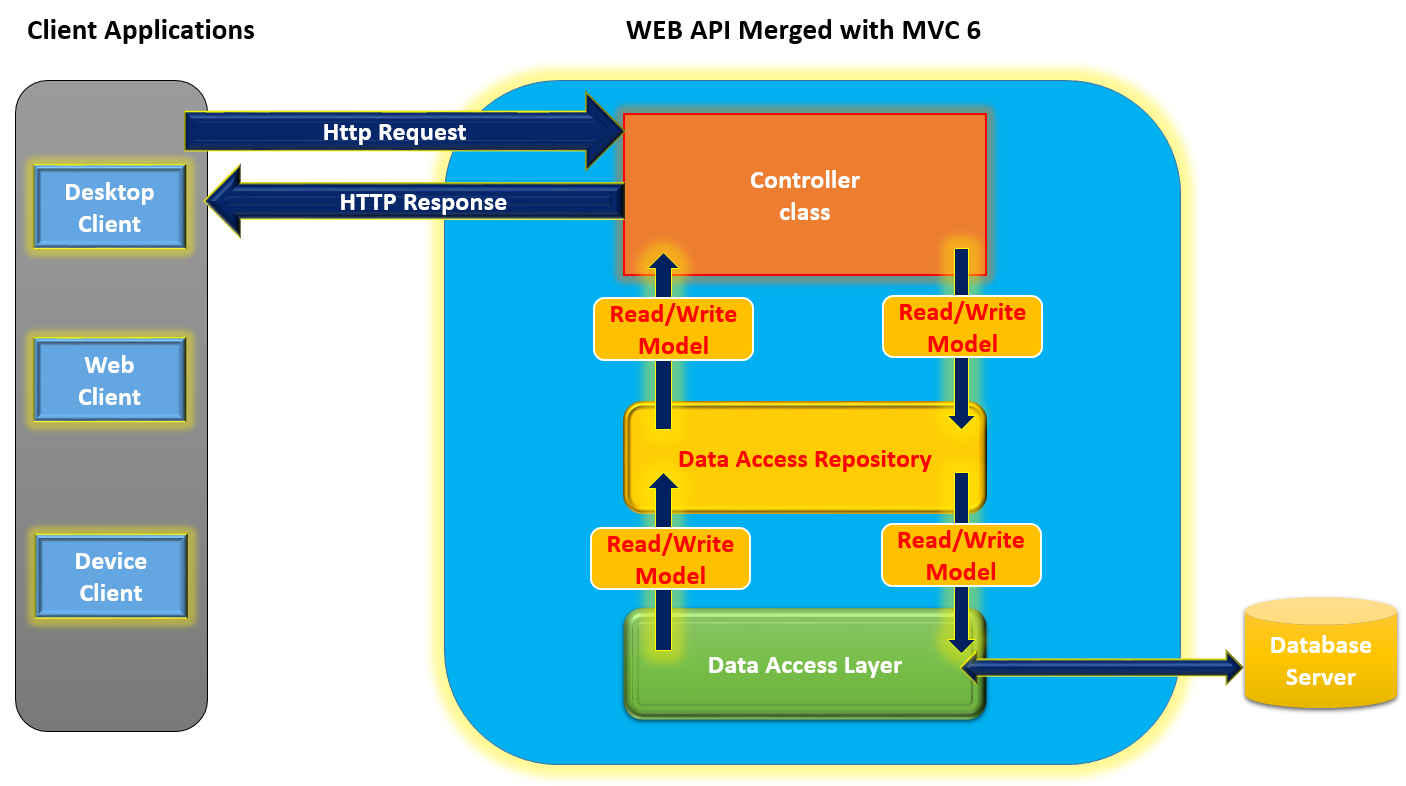
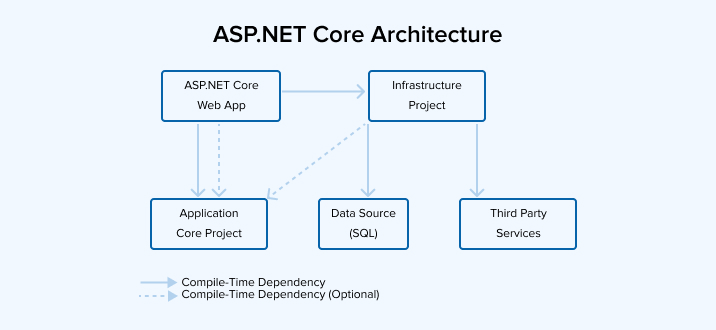
ASP.NET Core Web API development brings together a lightweight, cross‑platform runtime with a mature ecosystem. Whether you’re creating a mobile backend, a microservice, or a simple data endpoint, the framework offers built‑in routing, model validation, and dependency injection. Its modular design means you can ship just the libraries you need, keeping startup time and memory footprint low.
Getting Started: Create a New Project
Open a terminal or Visual Studio and run:
dotnet new webapi -n SimpleApicd SimpleApi
dotnet run
This scaffolds a minimal API template that includes Swagger for interactive documentation. The project structure looks like this:
Program.cs– Configures services and middleware.WeatherForecast.cs– Sample model.Controllers/WeatherForecastController.cs– Default controller.appsettings.json– Configuration.
Designing Your Data Model
Define a plain old CLR object (POCO) that represents the data you’ll expose. For example:
public class Product{
public int Id { get; set; }
public string Name { get; set; }
public decimal Price { get; set; }
}
Keep models simple; add validation attributes like [Required] or [Range] to enforce business rules automatically during model binding.
Creating Controllers and Action Methods
Controllers inherit from ControllerBase and use attributes to map HTTP verbs. A typical CRUD controller looks like this:
[ApiController][Route("api/[controller]")]
public class ProductsController : ControllerBase
{
private static readonly List _store = new();
[HttpGet]
public IEnumerable Get() => _store;
[HttpGet("{id}")]
public ActionResult Get(int id)
{
var product = _store.FirstOrDefault(p => p.Id == id);
return product is null ? NotFound() : Ok(product);
}
[HttpPost]
public IActionResult Create(Product product)
{
product.Id = _store.Count + 1;
_store.Add(product);
return CreatedAtAction(nameof(Get), new { id = product.Id }, product);
}
}
Notice the use of ActionResult<T> which lets you return typed responses while still supporting standard HTTP status codes.
Routing Basics and Attribute Routing
ASP.NET Core offers convention‑based routing, but attribute routing gives you fine‑grained control. By decorating actions with [HttpGet("{id}")], [HttpPost], and similar attributes, the framework automatically constructs the route template and matches incoming requests.
For APIs that evolve, consider using route prefixes like [Route("api/v1/[controller]")] to version endpoints cleanly.
Injecting Dependencies the ASP.NET Way
The built‑in dependency injection (DI) container is configured in Program.cs:
builder.Services.AddSingleton();builder.Services.AddControllers();
Controllers receive services through constructor injection. DI promotes testability and keeps your business logic decoupled from framework concerns.
Testing Your API Locally
Run dotnet run and open https://localhost:5001/swagger in your browser. Swagger UI lets you hit endpoints, inspect payloads, and verify responses without writing external scripts.
For unit tests, use xUnit or NUnit alongside the Moq library to mock repositories and test controller actions in isolation.
Deploying to the Cloud or Containers
ASP.NET Core is designed for containerization. Build an image with a Dockerfile:
FROM mcr.microsoft.com/dotnet/aspnet:8.0 AS baseWORKDIR /app
EXPOSE 80
FROM mcr.microsoft.com/dotnet/sdk:8.0 AS build
WORKDIR /src
COPY ["SimpleApi.csproj", "."]
RUN dotnet restore "./SimpleApi.csproj"
COPY . .
RUN dotnet build "SimpleApi.csproj" -c Release -o /app/build
FROM build AS publish
RUN dotnet publish "SimpleApi.csproj" -c Release -o /app/publish
FROM base AS final
WORKDIR /app
COPY --from=publish /app/publish .
ENTRYPOINT ["dotnet", "SimpleApi.dll"]
Push the image to a registry and deploy to Kubernetes, Azure App Service, or any container host.
Troubleshooting Common Issues
- 404 Not Found – Check that your controller’s route matches the request path.
- 400 Bad Request – Validate your JSON payload; missing required properties cause model binding errors.
- Performance hiccups – Ensure you’re not loading the entire dataset into memory; use pagination or async database calls.
Next Steps to Expand Your API
After mastering the basics, explore:
- Entity Framework Core – Persist data to SQL Server, PostgreSQL, or SQLite.
- JWT Authentication – Secure endpoints with bearer tokens.
- Middleware – Add custom logging, exception handling, or request tracing.
- OpenAPI Extensions – Enhance Swagger documentation with XML comments and custom UI.
FAQ
What version of .NET should I use for new ASP.NET Core Web API projects?
The latest long‑term support (LTS) release—currently .NET 8—is recommended, as it offers the newest features, performance improvements, and security patches.
Is ASP.NET Core suitable for building serverless functions?
Yes. You can host ASP.NET Core APIs in Azure Functions or AWS Lambda using the Azure Functions .NET Worker or the