Getting Started with STC Microcontroller Programming: A Beginner’s Guide
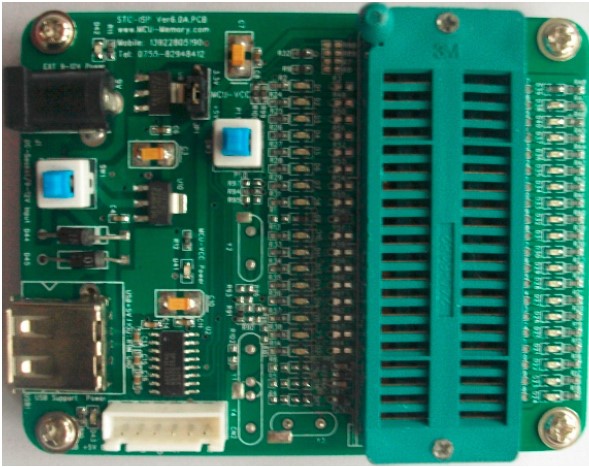
If you’ve just opened the box of an STC microcontroller and feel a mix of excitement and uncertainty, you’re in the right place. STC (STCMicro) offers a line of low‑cost 8051‑compatible chips that are popular among hobbyists and small‑scale engineers. This guide walks you through the essentials—hardware setup, toolchain selection, basic code structure, and a first “blink‑LED” project—so you can move from curiosity to confidence without getting lost in jargon.
Why Choose an STC Microcontroller?
STC devices strike a sweet spot between price and capability. They inherit the classic 8051 instruction set, meaning plenty of tutorials already exist, yet they also pack modern peripherals like built‑in UART, SPI, I²C, and PWM channels. For beginners, the low entry cost lets you experiment freely, and the wide community support means answers are rarely more than a forum click away.
Gathering the Essentials
Before you write a single line of code, make sure you have the following items on hand:
- STC development board or breakout module (e.g., STC12C5A60S2)
- USB‑to‑TTL serial adapter for programming and debugging
- Micro‑USB cable or appropriate power source (3.3 V–5 V)
- Breadboard and jumper wires for prototyping
- LED and resistor (≈220 Ω) for the classic blink test
- Programming software—the free STC‑ISP utility works on Windows, while SDCC (Small Device C Compiler) provides a cross‑platform C toolchain.
Setting Up the Toolchain
Most beginners start with the STC‑ISP flash utility because it offers a graphical interface and handles the bootloader protocol automatically. Here’s a quick rundown:
- Download the latest STC‑ISP package from the official STC website.
- Extract the archive and run the
STC-ISP.exefile. - Connect your STC board to the PC via the USB‑to‑TTL adapter. In the program, select the correct COM port and the target chip model.
- Set the baud rate (typically 115200 bps) and click “Connect.” If the LED on the adapter blinks, you’re good to go.
If you prefer writing in C, install SDCC and add its bin folder to your system PATH. Pair it with a simple text editor (VS Code, Sublime, or even Notepad++) and you’ll have a lightweight, open‑source development environment.
Understanding the Basic Project Structure
A minimal STC project usually contains three files:
- main.c – your application code.
- makefile (optional) – automates compilation and flashing.
- config.h – defines clock speed, I/O pin assignments, and any peripheral settings.
In main.c, you’ll typically see three sections: includes, initialization, and the main loop. The 8051 architecture uses special function registers (SFRs) to control hardware, so you’ll encounter names like P1 (Port 1) and TMOD (Timer Mode Register). Don’t worry—most STC examples hide these details behind macros, making the code readable even for newcomers.
First Project: Blinking an LED
Nothing says “I’m in control” like making an LED toggle on and off. Follow these steps, and you’ll have a working program in under ten minutes.
Wiring the Circuit
- Connect the LED’s anode (long leg) to P1.0 on the STC board.
- Attach the cathode (short leg) through a 220 Ω resistor to ground.
- Verify the board is powered (usually a red LED on the board will light).
Writing the Code
#include "stc15.h" // Header for STC15 series#define LED P1_0 // Map LED to Port 1.0
void delay_ms(unsigned int ms) {
unsigned int i, j;
for(i = 0; i < ms; i++)
for(j = 0; j < 120; j++); // Rough 1 ms delay at 11.0592 MHz
}
void main(void) {
while(1) {
LED = 0; // Turn LED on (active low)
delay_ms(500);
LED = 1; // Turn LED off
delay_ms(500);
}
}
This snippet does three things: includes the STC header, defines a convenient alias for the LED pin, implements a crude millisecond delay, and toggles the pin inside an infinite loop.
Compiling and Flashing
- Open a command prompt in the folder containing
main.c. - Run
sdcc -mstm8 -c main.c(adjust the target flag for your specific chip, e.g.,-mstm8for STC12 series). - Link the object file:
sdcc -mstm8 -o main.ihx main.rel. - Convert the Intel HEX file to a binary format if needed, then use STC‑ISP to load
main.ihxonto the chip.
After flashing, the LED should blink at a half‑second interval. If it doesn’t, double‑check the COM port, verify the wiring, and make sure the correct microcontroller model is selected in the ISP software.
Beyond the Blink: Common Peripherals
Once you’ve mastered basic I/O, the next step is to explore the built‑in peripherals that give the STC its real power.
- UART (Serial Communication) – Useful for sending debug messages to a PC. The
UART_Initfunction sets baud rate, parity, and stop bits. - I²C and SPI – Ideal for connecting sensors, EEPROMs, or display modules. STC provides library functions that handle start/stop conditions and data framing.
- PWM (Pulse‑Width Modulation) – Drives motors or LEDs with variable brightness. Adjust the duty cycle register to control output voltage.
- Timers and Counters – Generate precise delays, measure pulse widths, or create simple real‑time clocks.
Most of these peripherals require only a few lines of configuration code, and the STC datasheets include ready‑to‑copy examples. Don’t be afraid to copy, modify, and experiment—that’s how you internalize the hardware’s behavior.
Troubleshooting Tips
Even a simple blink project can run into hiccups. Here are a few common pitfalls and how to address them:
- Board not recognized: Verify the USB‑to‑TTL adapter’s driver is installed. On Windows, the
CH340driver is often required. - Program won’t flash: Check the bootloader jumper (if present) is set to “ISP” mode. Some STC chips require a reset pulse after flashing.
- LED stays dim: Ensure the LED is wired to the correct pin and that the pin isn’t inadvertently configured as an input.
- Delay too fast/slow: The crude delay loops depend on the crystal frequency. If you changed the external oscillator, adjust the loop count accordingly.
Where to Find More Resources
Learning never stops, and the STC community offers plenty of free material. Consider the following:
- STC official website – Datasheets, example code, and firmware updates.
- GitHub – Search for “STC” to discover open‑source projects ranging from simple sensor readers to full‑featured IoT nodes.
- Online forums such as ElecFreaks and ChinaDIY – Users share schematics, troubleshoot bugs, and post video tutorials.
- YouTube channels dedicated to 8051 and STC development – Visual walkthroughs can clarify wiring and debugging steps.
Frequently Asked Questions
Do I need a separate programmer for STC microcontrollers?
No. Most STC chips include a built‑in bootloader that accepts firmware over a UART‑style serial connection. A simple USB‑to‑TTL adapter is enough for programming and basic debugging.
Can I use Arduino libraries with an STC chip?
Not directly. Arduino libraries are written for AVR or ARM architectures, while STC uses the 8051 core. However, many concepts—like PWM or serial communication—are analogous, so you can translate the logic with a bit of effort.
Is C the only language I can program an STC with?
C is the most common, but you can also write assembly for performance‑critical sections. Some developers use BASIC or even Python‑based interpreters for rapid prototyping, though these require additional runtime support.
How do I handle power‑supply noise on the STC board?
Place a 0.1 µF decoupling capacitor close to the VDD pin and consider a larger electrolytic (10–100 µF) for overall stability. For noisy environments, a small LC filter on the supply line can prevent brown‑